NetCOBOL for Windows x64 - Excellent performance
and stability
Fujitsu NetCOBOL for Windows is an excellent COBOL compiler including complete with development environment. It allows you to design independent COBOL applications and components that can be used with Microsoft Visual tools. It also boasts excellent performance and high stability levels in conjunction with a whole range of tools and data base support items needed to develop professional business applications.
Advantages
Integrated development environment
High reliability
Solid development platform
Many practical tools
Embedded SQL
XML support
Unicode support
Support for remote debugging
UTF-32 support
Very high performance and reliability levels
NetCOBOL for Windows belongs to the NetCOBOL compiler range developed by Fujitsu. Impressive performance on target platforms and high stability levels have been hallmarks of the NetCOBOL compiler range for decades.
"It just works! No incomprehensible error messages, no hours of searching for errors I didn't cause and no dependence on technical support to get things working."
NetCOBOL for Windows x64 customers
Database connectivity
NetCOBOL supports Embedded SQL access (“EXEC SQL”) to SQL servers, Oracle, Informix, Sybase, and any other ODBC-enabled database. You therefore gain the possibility to use a relational database of your choosing. For this purpose, a ODBC utility is provided which will help you with the setup.
Enhanced tool to sort and merge data
The speed of COBOL’s standard sorting function can be significantly increased and its functionality enhanced with the support program PowerBSORT. PowerBSORT can retrieve files from COBOL, via the command line, or with another programming language such as C and subsequently sort these with a predefined key or merge them. Additionally, you can select records according to certain conditions, combine them in summations, reformat or rebuild them. PowerBSORT is able to use COBOL, text, binary, CSV, and TSV file formats and supports ASCII, Extended UNIX Coding (EUC), and Unicode character sets.
Complete development package
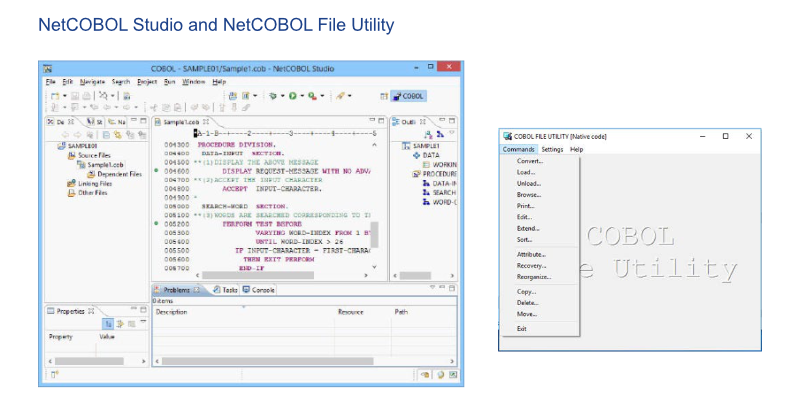
NetCOBOL for Windows comes complete with an integrated development environment and offers, amongst others, an editor, compiler, interactive debugging, and an executable environment. It also offers a range of additional programming tools such as a COBOL data file editor, a data converter, PowerFORM, a tool to design graphical print forms, and PowerBSORT, an interactive Batch and COBOL sorting tool. Especially useful is the NetCOBOL Studio IDE, which is a development environment based on Eclipse and offers numerous features. With its subroutines designed to support various web protocols as well as its connectivity with many databases, NetCOBOL for Windows covers the requirements of most COBOL programmers in a single package.
NetCOBOL Studio is based on Eclipse
NetCOBOL Studio enables you to develop future-proof applications. Eclipse is one of the most common development platforms offering well-known market-proof basis for COBOL and non-COBOL developers.
Windows compiler opens the door to Linux
An increasing number of companies are looking for ways to make more effective use of the Linux platform for their COBOL development. NetCOBOL for Windows is here to fill the gap. It is a secure development platform for Windows which also also allows for remote development under Linux. In combination with the NetCOBOL for Linux Compiler you may develop under Windows while you edit, debug and execute your code under Linux. This is done in NetCOBOL Studio which is based on Eclipse.
Subroutines support
NetCOBOL is the only non-IBM COBOL compiler which provides access to the IBM Language Environment Services (LE Services). In general, NetCOBOL for Windows x64 supports the following subroutines:
IBM Language Environment Services
Micro Focus CBL subroutines
Data-access subroutines
These and other NetCOBOL subroutines enhance the compatibility with existing applications and simplify migrations into the NetCOBOL environment.
Additional functions
Support for native 64-bit code
Preprocessors for embedded SQL with ODBC support
Compatibility with the ANSI standard COBOL X3.23 1985
Compatibility with VS COBOL II and OS/VS COBOL
Remote development for NetCOBOL for Linux
Verified support for Oracle Pro*COBOL
CGI-, ISAPI- and SAF-supported subroutines
Conversion of data between COBOL data files and XML
Fully functional, integrated COBOL development environment (editing, compiling and debugging)
Support for multithreading
Creating and working with COM/DCOM objects
Support for object-oriented programming
Availability of COBOL objects via Active Server Pages
Recording of events, error tracing information in case of a crash, and real-time debugging


Integrated development environment